Archive ·
old wiki · last edited February 2010
SAM3S USB Sniffer Hardware
Hardware Setup
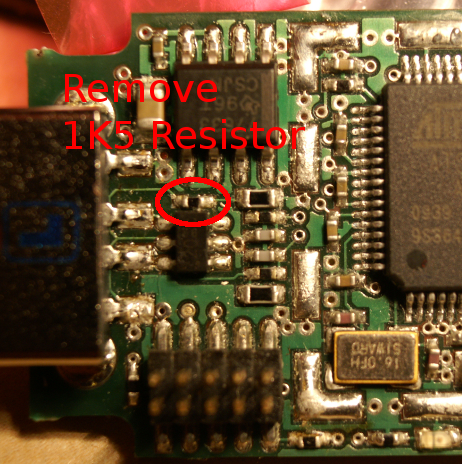
Note the SAM7S processor required an external 1.5K pull-up resistor. The SAM3S has this integrated internally, as it allows the pull-up to be under software control. The current code makes use of this, hence requires the removal of the external 1.5K resistor.
The following picture shows the resistor which should be removed:
Programming Files
20100222_sam3s_2400MHz.bin 20100222_sam3s_900MHz.bin
INF Driver File
Specific Notes
The LEDs will go in a chase pattern when plugged in, where each of the 3 LEDs lights in sequence. Once the USB-Ethernet driver is fully connected, the LED nearest to the USB port will light up and the rest will be off.
Note the USB-Ethernet driver may not be fully initialized by the host until it is actually used, ie: when you connect to the device with Wireshark.
Known Issues
- USB Standby isn’t supported / draws far too much current. This may prevent your host system from going to sleep when the SAM3S USB Stick is plugged in.
- The “Debug Comm” in the Java applet is not supported on the SAM3S device. Instead you use the physical serial port.
- Pressing the “Firmware Upgrade” button on the Java app results in the the device reverting to SAM-BA mode. As I can’t get SAM-BA to work, you need to use the JTAG to get out of this! The GPNVM bit 1 becomes clear, you need to somehow set CPNVM bit 1 to restore normal operation.