Programming the SAM7S USB Stick
Hardware Setup
Connect the hardware as the following picture illustrates:
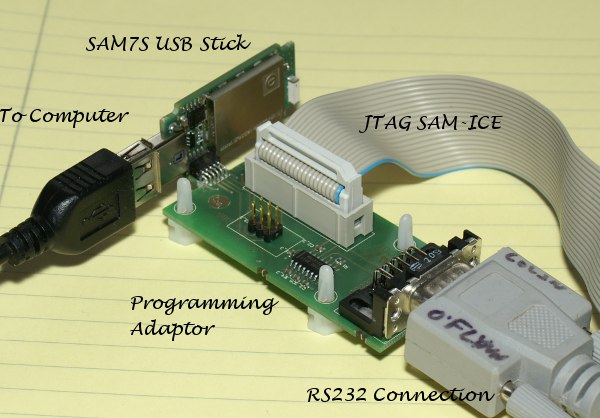
A variety of notes about this connection:
- You may need to take the plastic case of the USB stick off. It is just a press-fit close, use a knife or similar to pry it open. A dull knife is suggested, but I’m not your mother so use whatever you want.
- You’ll almost certainly need a USB extension cable to fit the programming adaptor board, but if you lack one try using a horizontally oriented USB port on a laptop and see if the programming board can clear the laptop case. If it’s not your laptop try filling down the laptop case (mostly kidding).
- The RS232 connection isn’t for programming, but will be needed to set up some stuff
Getting the Software
The SAM-ICE is a Segger JLink rebranded, and only valid with Atmel processors. Get the latest “software documentation pack” from:
http://www.segger.com/cms/jlink-software.html
Programming
Set up everything as above, and Windows will probably install some drivers for the JLink for you. Then download the following script file which has the programming commands in it, and save to the same directory as the SAM7S Binary File: program.jlink
If that link doesn’t work, the file just has the following in it: ^ exec device = AT91SAM7S256 //Processor speed 12000 //12 KHz JTAG Clock h //Halt core loadbin 15dot4-sniffer-0.1-sam7s24.bin, 0x00100000 //Program the .bin file into the proper offset r //Reset core g //Go, start program ^
Note the “15dot4-sniffer-0.1-sam7s24.bin” is the filename, you might have to change that with later releases.
Finally just run the script file as follows:
^“C:\Program Files\SEGGER\JLinkARM_V414a\JLink.exe” program.jlink^
If jlink.exe is in your path you won’t need a full path, just try “jlink.exe program.jlink” first maybe.
The result should look something like:
^ SEGGER J-Link Commander V4.14a (’?’ for help) Compiled Apr 21 2010 20:54:48 DLL version V4.14a, compiled Apr 21 2010 20:54:28 Firmware: J-Link ARM V6 compiled Jun 30 2009 11:05:04 Hardware: V6.00 S/N : 26002672 OEM : SAM-ICE Feature(s) : RDI Info: TotalIRLen = 4, IRPrint = 0x01 VTarget = 3.287V Found 1 JTAG device, Total IRLen = 4: #0 Id: 0x3F0F0F0F, IRLen: 04, IRPrint: 0x1, ARM7TDMI Core Found ARM with core Id 0x3F0F0F0F (ARM7) JTAG speed: 100 kHz
Script file read successfully. Processing script file…
JTAG speed: 12000 kHz
Info: TotalIRLen = 4, IRPrint = 0x01 PC: (R15) = 002011C6, CPSR = 000000DF (System mode, ARM FIQ dis. IRQ dis.) R0 = FFFFFF74, R1 = 00000000, R2 = B8C7BCD7, R3 = 95341A9C R4 = 57CA8915, R5 = 7E4A8346, R6 = 4A8A8989, R7 = D8499B14 USR: R8 =3A2D8EA0, R9 =2E43AA0B, R10=C5CF7F1B, R11 =F54AD30B, R12 =7E37FD3B R13=37D83BBB, R14=BCBA9D1A FIQ: R8 =FFFFFFFF, R9 =00000010, R10=00800000, R11 =00000010, R12 =00000000 R13=00202368, R14=10000000, SPSR=B00000B0 SVC: R13=00201100, R14=00100018, SPSR=F000003F ABT: R13=00008020, R14=08020000, SPSR=200000F2 IRQ: R13=002023C8, R14=8000001F, SPSR=8000001F UND: R13=00000010, R14=04000000, SPSR=000000B0
Loading binary file… [15dot4-sniffer-0.1-sam7s24.bin] Writing bin data into target memory @ 0x00100000.
Reset delay: 0 ms Reset type NORMAL: Using RESET pin, halting CPU after Reset Info: TotalIRLen = 4, IRPrint = 0x01
Script processing completed.
J-Link> ^
You can press Ctrl-C to quit the JLink program.